Download the 991cw App – Full Casino in Your Pocket
The 991cw App brings slots, live casino tables, crash games and sports betting to your Android phone. Free APK download, bKash and Nagad deposits accepted, and your account syncs perfectly with the web version. Install in under two minutes.
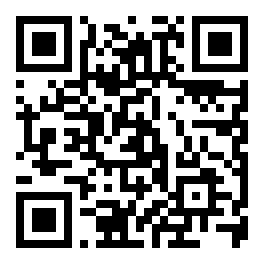
Scan to download
991cw.apk
App vs Web Browser – What's Different
Both options give you the full 991cw game lobby. The app goes further on speed and mobile convenience.
| Feature | 991cw App (APK) | Web Browser |
|---|---|---|
| Full game lobby (1,500+ games) | Yes | Yes |
| Push notifications for bonuses | Yes | No |
| One-tap login (fingerprint) | Yes, if device supports it | No |
| bKash / Nagad deposit | Yes, in-app redirect | Yes |
| Live dealer video quality | Optimised for mobile GPU | Depends on browser |
| Works on 4G / weak signal | Better data compression | Standard loading |
| Offline game history | Cached locally | No |
| Auto-update to latest version | In-app prompt | Always latest |
| iOS support | Android only (APK) | Safari / Chrome |
| File size | 28 MB download | No install needed |
iOS users: open 991cw.co in Safari, tap the Share icon, then Add to Home Screen. This pins a shortcut that behaves like an app without any APK download.
System Requirements & Version Details
Check these before you download – most mid-range Android phones from 2019 or later will work fine.
| 991cw App – File Information | |
|---|---|
| App Version | 3.4.6 |
| File Name | 991cw.apk |
| File Size | 28 MB |
| Minimum Android | Android 8.0 (Oreo) |
| Last Updated | 9 November 2026 |
| Price | Free |
| Language | English / Bangla |
| Recommended Specifications | |
|---|---|
| RAM | 2 GB minimum, 3 GB+ recommended |
| Storage free | 60 MB (app + cache) |
| Internet | 4G or Wi-Fi (live casino needs stable connection) |
| Processor | Quad-core 1.4 GHz or better |
| Screen | 5-inch or larger, any resolution |
| Google Play required? | No – direct APK install |
If your phone runs Android 8 or higher, you're good. Walton, Symphony and Samsung Galaxy models widely used in Bangladesh all meet these requirements.
What You Can Do Inside the App
Every section of 991cw is accessible from the app – not a stripped-down mobile version.
Slots & Crash Games
Play Fortune Snake, Dragon Gate, Coin and other PG Soft and Evolution titles with full touch controls. Crash games load fast even on 4G. Bet from ৳1 and set auto-bet for uninterrupted sessions. The lobby filters by provider so you find favourites quickly.
Live Dealer Tables
Stream Andar Bahar, Roulette and 3-Hand Casino Hold'em from Evolution and Ezugi studios. The app optimises video bitrate for your connection speed, so you get smooth live feeds even on a mid-range phone. Chat with dealers in real time from the table interface.
Instant Deposit via bKash & Nagad
Tap Deposit, choose bKash or Nagad, and the app opens the payment screen directly. Funds arrive in about 4 minutes. Minimum deposit is ৳200. Rocket, Upay and Bank Transfer are also available. No copy-pasting of numbers – the reference code fills automatically.
Cricket & Sports Betting
Follow BPL, IPL T20 and international ODIs live. Place pre-match and in-play bets on cricket, football and kabaddi. The app shows live scores and odds updates in real time. Your bet slip saves automatically so you can review it before confirming. Perfect for match days.
Bonus Notifications
Turn on push notifications and 991cw alerts you when a reload bonus, cashback credit or limited-time offer goes live. The app links directly to the offer page so you can claim in one tap. First-deposit bonus of 220% (up to ৳11,500) is claimable right after you register.
Withdrawal Tracking
Submit a withdrawal and track its status from the app's transaction history screen. Most withdrawals process in about 45 minutes. Minimum withdrawal is ৳1,200 and the daily limit is ৳140,000. KYC documents can be uploaded directly from your phone's gallery without opening a browser.
Permissions & Security – What the App Requests
The 991cw App only asks for permissions it actually needs. No contacts, no camera, no microphone access.
SSL Encryption on Every Connection
All data between the app and 991cw servers travels over TLS 1.3. This includes login credentials, payment details and bet history. The certificate is verified on each session start, so a fake Wi-Fi hotspot cannot intercept your traffic. You're protected the same way as internet banking.
Internet Access Only
The only Android permission the APK requests is internet access. It does not read your contacts, location, gallery or microphone. When you upload a KYC document, Android's standard file picker opens – the app never gets direct access to your storage. You can verify this in your phone's App Info screen after installing.
Account PIN & Session Lock
Set a 4–6 digit PIN in account settings for quick re-login without typing your full password. After five minutes of inactivity, the app locks automatically. If your phone is lost, you can log out all sessions from any browser by going to Account > Active Sessions and tapping "Sign Out Everywhere".
APK Authenticity Check
Only download 991cw.apk from 991cw.co/991cw-app/ or the direct link on this page. Third-party APK mirror sites may bundle modified files. After downloading, Android shows the app package name as co.991cw.app during installation – if the name differs, delete the file and download again from this page.
Install the APK on Android – Step by Step
From tap to first login in about two minutes. These steps work on Samsung, Walton, Symphony and all other popular Bangladesh Android brands.
-
01
Allow Unknown Sources
Go to Settings → Security (or Apps → Special App Access → Install Unknown Apps on Android 10+). Find your browser or file manager and toggle on Allow from this source. This one-time step lets Android install APK files that don't come from Google Play.
-
02
Download 991cw.apk
Tap the Download APK button on this page. Your browser saves the file to your Downloads folder – the filename is 991cw.apk and the size is 28 MB. Wait for the download bar to complete before proceeding. On slow connections, the download takes under two minutes on 4G.
-
03
Tap to Install
Open your notifications panel and tap the completed download, or use your phone's File Manager to find the APK in Downloads. Tap it, then tap Install on the Android prompt. The installation takes about 20 seconds. No account or payment is needed at this stage.
-
04
Log In or Register
Open the 991cw App from your home screen. If you already have an account, enter your phone number and password. New to 991cw? Tap Register and complete the form – it takes under a minute. Your 220% first-deposit bonus is waiting once you fund your account via bKash or Nagad.
-
05
Deposit & Play
Tap Deposit, choose bKash (minimum ৳200), and confirm the transaction. Funds arrive in about 4 minutes. Head to the Casino or Sports lobby and pick any game to start. Your bonus credits apply automatically on your first deposit – no code needed, no manual claim required.
iPhone / iPad Users – Add to Home Screen
- Open Safari and visit 991cw.co
- Tap the Share button (box with upward arrow) at the bottom of the screen.
- Scroll down and tap "Add to Home Screen".
- Name it "991cw" and tap Add in the top right corner.
- The 991cw icon now appears on your home screen. Tap it to open in full-screen mode without the browser toolbar.
This creates a Progressive Web App shortcut. It is not a native app download, but all features – including deposits, live casino and withdrawals – work the same way.
Get the File – Direct APK Download
Use the button below or scan the QR code. The file is served from 991cw's own servers.
Scan on Android
to download
- Minimum Android: 8.0 (Oreo)
- Last updated: 9 November 2026
- Needed storage: ~60 MB after install
- Package name: co.991cw.app – verify after install
Games Available in the App


Common Installation Problems – Quick Fixes
If the APK won't install or the app crashes on launch, one of these fixes should solve it.
| Problem | Most Likely Cause | Fix It |
|---|---|---|
| "Install blocked" message appears | Unknown Sources permission not enabled for the browser or file manager you used to open the APK. | Go to Settings → Security → Install Unknown Apps. Find your browser (Chrome, Firefox) and switch Allow to On. Then tap the APK file again. |
| App crashes immediately on launch | Android version below 8.0, or the APK file was corrupted during download (incomplete transfer). | Check your Android version under Settings → About Phone. If it's 7 or below, use the web version at 991cw.co. If Android 8+, delete the file and download again from this page. |
| "Parse error" during installation | The downloaded file is not a valid APK – it may have been partially downloaded, or a different file type was renamed as .apk. | Delete the file. Clear your browser's download queue, reconnect to a stable Wi-Fi or 4G connection, and tap the Download APK button again. Do not rename any files manually. |
| Login fails after installation | Incorrect password entry, or account not yet registered. The app login uses the same credentials as the website. | Tap "Forgot Password" on the login screen to reset via your registered phone number. If you don't have an account yet, tap Register – the full sign-up form is inside the app. See the register page for details. |
| Games load slowly or freeze mid-play | Weak internet signal, or too many background apps consuming RAM on a low-end device. | Switch from mobile data to Wi-Fi if available. Close background apps from the Recent Apps menu. For live casino games, a stable 4G or Wi-Fi connection is strongly recommended. Crash games and slots run on weaker signals. |
Still stuck? The 991cw 24/7 live chat support team can walk you through the installation. Open the chat widget on the site while you work through the steps.
Get the 991cw App on Your Phone
Free APK · 28 MB · Android 8.0+ · Version 3.4.6
-
Faster on 4G
Compressed data loads games quicker than a browser on a weak signal — useful when you're not on Wi-Fi.
-
Bonus push alerts
Get notified the moment a reload offer or cashback lands on your account. No need to check the web.
-
One-tap bKash & Nagad deposit
In-app redirect takes you straight to the payment screen. Funds clear in about 4 minutes.
-
Fingerprint login
Skip typing your password every time — if your device supports biometrics, the app uses it automatically.
Scan to download
iOS users: Open 991cw.co in Safari, tap Share, then Add to Home Screen for a shortcut that behaves like an app.
Frequently Asked Questions
Answers to the most common questions about the 991cw App.
01 Is the 991cw APK safe to install?
Yes, when you download from 991cw.co/991cw-app/ directly. The APK is signed with 991cw's official certificate – the package name shown during installation is co.991cw.app. The app only requests internet permission; it does not access your contacts, photos or microphone. Avoid APK mirror sites that repackage files. If you download from this page, the file is genuine. After installing, your Android security settings will return to their previous state automatically.
02 Why isn't 991cw on the Google Play Store?
Google Play does not list real-money gambling apps for the Bangladesh market. This is a Play Store policy, not a reflection of the app's safety or legitimacy. Distributing the 991cw App as a direct APK is the standard approach used by all licensed online casinos serving Bangladesh players. The app itself is identical in functionality to what you'd find on a regulated store – the only difference is the installation method, which requires enabling Unknown Sources once.
03 How do I update the 991cw App to the latest version?
When a new version is available, the app shows an in-app notification on launch with a direct download link. Tap it, download the new APK, and install it over the existing version – your account data, settings and balance are preserved. You can also return to this page and tap the Download APK button at any time; it always points to the current version (3.4.6 as of this writing). No need to uninstall the old version first.
04 Can I use the same account on both the app and the website?
Yes. Your 991cw account is shared across all platforms. Log in with the same phone number and password on the app, the website, or both simultaneously. Your wallet balance, bet history, bonus status and VIP progress all sync in real time. If you registered on the website, you can log straight into the app without creating a new account. Similarly, if you register through the app, you can log in at 991cw.co from any browser.
05 Does the 991cw App work on iPhone or iPad?
There is no native iOS app at this time – Apple's App Store policies are similar to Google's for real-money gambling in this region. iPhone and iPad users can open 991cw.co in Safari and tap Share → Add to Home Screen. This creates a full-screen shortcut that removes the browser toolbar and behaves much like an installed app. All features work in Safari: deposits, live casino streaming, withdrawals and bonus claims. No download is required on iOS.
06 What should I do if the installation says "App not installed"?
This error usually means an older or conflicting version of the app is already on the device. Go to Settings → Apps → find any existing 991cw app and uninstall it completely. Then re-install the freshly downloaded APK. If the error persists, restart your phone and try again. In rare cases, insufficient storage causes this – check that you have at least 60 MB free under Settings → Storage. Contact 24/7 live chat support if none of these steps resolve it.
07 Can I deposit using bKash directly inside the app?
Yes. Tap Deposit in the app, select bKash, and enter the amount (minimum ৳200). The app generates a unique payment reference and directs you to the bKash screen. Complete the payment in bKash – your 991cw wallet updates in about 4 minutes. Nagad, Rocket, Upay and Bank Transfer work the same way. The first deposit unlocks your 220% welcome bonus, up to ৳11,500. For a full guide on payment methods, see the deposit guide.
Download Now
Free APK for Android 8.0+. File size 28 MB. Version 3.4.6, updated 9 November 2026.
Download APKNew to 991cw?
Register in under a minute and claim your 220% first-deposit bonus up to ৳11,500. Works on the app and the website.
Register FreeAlready have an account?
Log in and go straight to the game lobby. Your balance, bonuses and VIP status carry over from the website automatically.
Log In